


Paths and Operations
In Swagger terms, paths are endpoints (resources) that your API exposes, such as /users or /reports/summary, and operations are the HTTP methods used to manipulate these paths, such as GET, POST or DELETE.
API paths and operations are defined in the global paths section of the API specification.
paths: /ping: ... /users: ... /users/{id}: ...All paths are relative to basePath (see API Host and Base URL). The full request URL is constructed as scheme://host/basePath/path.
Path Templating
Section titled “Path Templating”Swagger supports path templating, meaning you can use curly braces {} to mark parts of a URL as path parameters:
/users/{id}/organizations/{orgId}/members/{memberId}/report.{format}The API client needs to provide appropriate parameter values when making an API call, such as /users/5 or /users/12.
Operations
Section titled “Operations”For each path, you define operations (HTTP methods) that can be used to access that path. Swagger 2.0 supports get, post, put, patch, delete, head, and options. A single path can support multiple operations, for example, GET /users to get a list of users and POST /users to add a new user. Swagger defines a unique operation as a combination of a path and an HTTP method. This means that two GET or two POST methods for the same path are not allowed – even if they have different parameters (parameters have no effect on uniqueness). Minimal example of an operation:
paths: /ping: get: responses: 200: description: OKMore detailed example with parameters and response schema:
paths: /users/{id}: get: summary: Gets a user by ID. description: > A detailed description of the operation. GitHub Flavored Markdown can be used for rich text representation, such as **bold**, *italic* and [links](https://swagger.io). operationId: getUsers tags: - users produces: - application/json - application/xml parameters: - name: id in: path description: User ID type: integer required: true responses: 200: description: OK schema: $ref: "#/definitions/User" externalDocs: url: http://api.example.com/docs/user-operations/ description: Learn more about User operations provided by this API.definitions: User: type: object properties: id: type: integer name: type: string required: - id - nameOperations support some optional elements for documentation purposes:
- A short
summaryand a longerdescriptionof what the operation does.descriptioncan be multi-line and supports GitHub Flavored Markdown for rich text representation. tagsare used to group operations in Swagger UI.externalDocsallows referencing an external resource that contains additional documentation.
Operation Parameters
Section titled “Operation Parameters”Swagger supports operation parameters passed via path, query string, headers and request body. For details, see Describing Parameters.
operationId
Section titled “operationId”Each operation may specify a unique operationId. Some code generators use this value to name the corresponding methods in code.
/users: get: operationId: getUsers summary: Gets all users. ... post: operationId: addUser summary: Adds a new user. ... /user/{id}: get: operationId: getUserById summary: Gets a user by user ID. ...Query String in Paths
Section titled “Query String in Paths”Query string parameters must not be included in paths. They should be defined as query parameters instead. Incorrect:
paths: /users?role={role}:Correct:
paths: /users: get: parameters: - in: query name: role type: string enum: [user, poweruser, admin] required: falseThis also means that it is impossible to have multiple paths that differ only in query string, such as:
GET /users?firstName=value&lastName=valueGET /users?role=valueThis is because Swagger considers a unique operation as a combination of a path and the HTTP method, and additional parameters do not make the operation unique. Instead, you should use unique paths such as:
GET /users/findByName?firstName=value&lastName=valueGET /users/findByRole?role=valueMarking as Deprecated
Section titled “Marking as Deprecated”You can mark specific operations as deprecated to indicate that they should be transitioned out of usage:
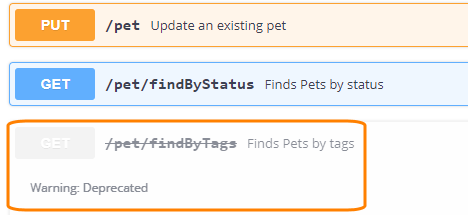
/pet/findByTags: get: deprecated: trueTools may handle deprecated operations in a specific way. For example, Swagger UI displays them with a different style:
Did not find what you were looking for? Ask the community
Found a mistake? Let us know